
How to Buy and Store Parts in Mechanic Legends
Last updated:
Buying the right replacement starts with identifying the part and the engine or vehicle it fits. Choose workshop delivery or shop at Parts Direct, then collect your order and keep spare parts in Your Parts.
Open Part Store at the Workshop workbench for free delivery, or buy at Parts Direct and collect your purchase at the counter. Select parts for the current engine model; each delivery box holds up to eight parts. Pick up removed parts to store them, then browse or search for them in Your Parts.
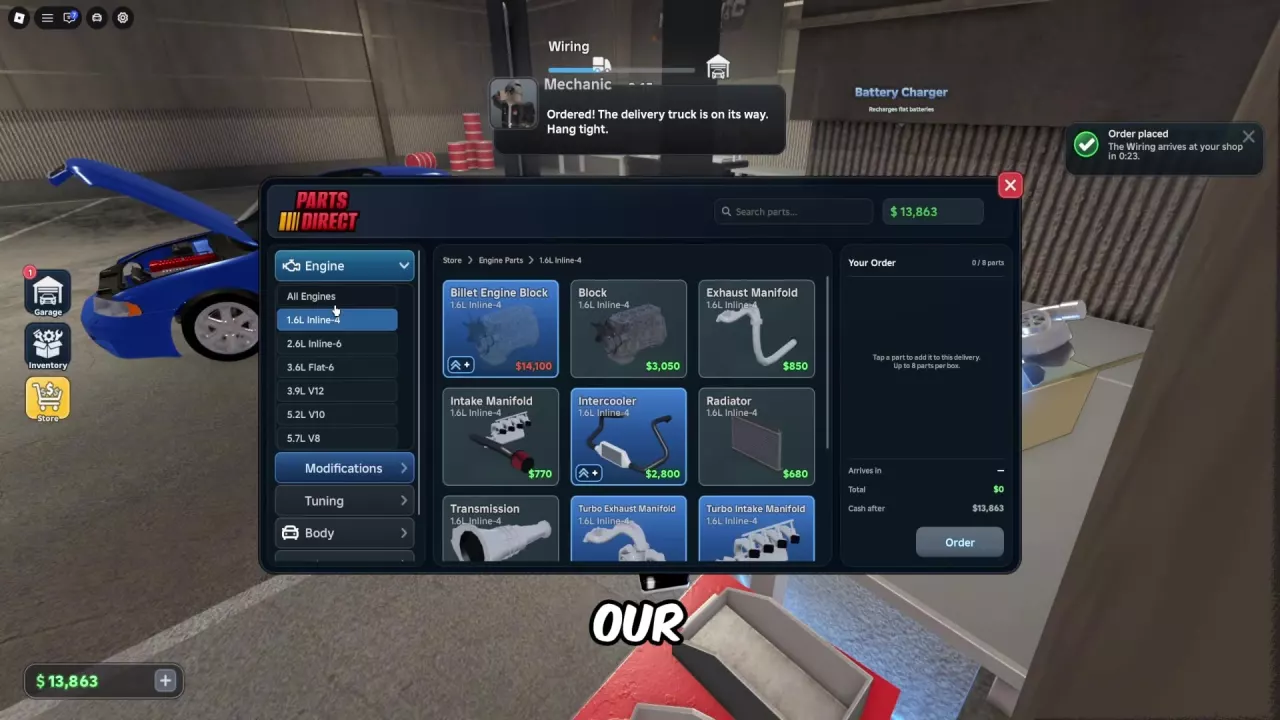
Choose Workshop Delivery or Parts Direct
- Workshop delivery: Open Part Store at the Workshop workbench. The entrance is marked Free Delivery, and the truck brings your order to the shop.
- Parts Direct: Visit the store to browse and buy parts in person. At the 5.2L V10 engine display, press E on the Browse Parts prompt.
Select the Matching Model and Place the Order
Identify the engine currently installed and the part you need before ordering.
- Open Store, choose Engine, and select the matching engine model. You can also search for the part by name.
- Check the model label and click the part to add it to your order.
- Review the total and Cash after amount, make sure you can afford the purchase, and select Order.
A delivery box holds up to eight parts. For individual part names, labels and prices, use the parts directory; the engine model guide helps identify matching engine categories.
Collect Delivered Parts or Counter Purchases
For a workshop order, wait for the delivery truck to reach your shop, then collect the delivered parts. You can work on other removed parts while the order is on its way.
For a purchase made inside Parts Direct, follow the purchase notification and collect the parts at the counter.
Store and Find Parts in Your Parts
Pick up a removed part and store it in your backpack. Open Your Parts to browse or search the parts you own, then check the engine or vehicle label before selecting one for installation.
You can keep removed parts such as front and rear bumpers, intake and exhaust manifolds, and radiators. Parts with the same name can have different engine labels, so use the label to distinguish them.
Wrong Model or Missing Prerequisite?
If a part does not fit the current engine, choose the corresponding part for that engine model. If the prompt asks you to install another part first, follow that assembly order instead.
For example, when installing a 1.6L Inline-4 Exhaust Manifold, install the Valve Cover first if prompted. Then align the manifold with its mounting position and hold the left mouse button to install it. See the repair and workshop guide for more on removing and installing parts, or the engine problems guide for missing-part and startup messages.